Release Notes - Beta v0.11
Summary
This release introduces Job Report Generation and Bulk CV Upload capabilities, streamlining recruitment workflows with comprehensive reporting and batch candidate processing. Recruiters can now generate detailed PDF reports for any job posting with complete statistics and candidate breakdowns, while the new bulk upload feature allows processing multiple candidate CVs simultaneously with intelligent AI-powered evaluation.
What's New
- Job Report PDF Generation with comprehensive statistics and candidate details
- Bulk CV Upload supporting PDF and DOCX formats
- 10-step AI-powered background processing for bulk applications
- Advanced candidate information extraction and duplicate detection
- Auto-shortlisting and assessment assignment for bulk uploads
Improvements
- Enhanced job application workflow with batch processing capabilities
- Improved reporting with conversion rates and funnel analytics
- Streamlined candidate onboarding with automated AI reviews
UI/UX Improvements
- Status Bar & Footer: Removed online/offline status indicator; added current time display
- App Header: Removed sign out button, dark/light mode toggle, and company switcher for cleaner interface
- Settings UI: Removed vertical separator line and card shadows for modern flat design
- Notifications: Redesigned with timeline-based layout for better visual hierarchy
Job Report Generation
Generate Comprehensive PDF Reports for Job Postings
The new Job Report Generation feature enables recruiters to create detailed, professional PDF reports for any job posting. These reports include complete job details, candidate information, application statistics, and conversion funnel analytics - perfect for stakeholder presentations, hiring reviews, and recruitment analytics.
Core Features:
- One-Click Download: Generate and download job reports instantly from the job page
- Comprehensive Statistics: Total applications, status breakdown, and conversion rates
- Complete Candidate Details: All candidate information including scores, status, and reasoning
- Professional Layout: Clean, printable PDF format with company branding
- Real-Time Data: Reports reflect current application status and metrics
- User Attribution: Shows who generated the report and when
Report Contents:
Job Information Section:
- Job Title and Serial Number
- Department, Location, and Employment Type
- Experience Level and Remote Type
- Salary Range and Number of Positions
- Job Status (Open/Closed)
- Posted Date and Closing Date
- Full Job Description (up to 1500 characters)
- Required Skills List (up to 20 skills)
Application Statistics:
- Total Applications: Complete count of all applications
- Status Breakdown: Count and percentage for each application status
Candidate Details Table:
For each candidate application:
1. Candidate Information:
- Full Name with index number
- Phone Number
- Location (cleaned format)
- Email Address
- Application Date
2. AI Review Score: Percentage score (if available)
3. Application Status: Current status (shortlisted, rejected, etc.)
4. Status Reason:
- AI recommendation or evaluation notes
- Strengths and recommendations for shortlisted candidates
- Concerns and reasons for rejected candidates
- Imported/referred candidate indicators
How It Works:
Generating a Job Report:
1. Navigate to Jobs page
2. Click on any job to view job details
3. Locate the "Download Report" button in the job actions area
4. Click "Download Report"
5. PDF report is generated in the background (may take a few seconds)
6. Report automatically downloads to your device
7. Open the PDF to view complete job and candidate analytics
Report Layout:
Page 1:
- Header with company logo and "Job Report" title
- Job title and complete job details
- Job description and required skills
- Application statistics table
- Beginning of candidate list
Subsequent Pages:
- Continuation of candidate details table
- Proper spacing with no header/footer overlap
- Clean page breaks between candidates
Last Page:
- Footer with report metadata (printed by, date)
Key Features:
Professional Formatting:
- Clean, modern PDF layout optimized for printing
- Company logo integration in header
- Proper page margins and spacing
- Table-based candidate presentation
- Clear section headers and dividers
Comprehensive Data:
- Complete job posting details and requirements
- All candidate applications with full information
- AI review scores and recommendations
- Application status and evaluation reasoning
- Statistical breakdowns and percentages
Smart Truncation:
- Long descriptions truncated with ellipsis (...)
- Status reasons limited to 150 characters for readability
- Skills list capped at 20 most relevant skills
- Candidate info condensed for table format
Benefits:
- Stakeholder Reporting: Professional reports for hiring managers and executives
- Recruitment Analytics: Data-driven insights into hiring funnel performance
- Audit Trail: Document hiring decisions and candidate evaluations
- Team Collaboration: Share recruitment progress with team members
- Client Presentations: Present candidate pipelines to external clients (agencies)
- Performance Tracking: Monitor conversion rates and application quality
- Quick Reference: Offline access to job and candidate data
- Record Keeping: Archive job reports for compliance and future reference
Use Cases:
- Weekly Hiring Reviews: Present current candidate pipeline to hiring managers
- Executive Reporting: Summarize recruitment metrics for leadership team
- Client Updates: Share candidate progress with external clients (recruitment agencies)
- Audit Documentation: Maintain records of hiring decisions and AI recommendations
- Team Meetings: Discuss candidate shortlists with interview panel
- Compliance: Document candidate evaluation process for regulatory requirements
- Historical Analysis: Compare job performance across different time periods
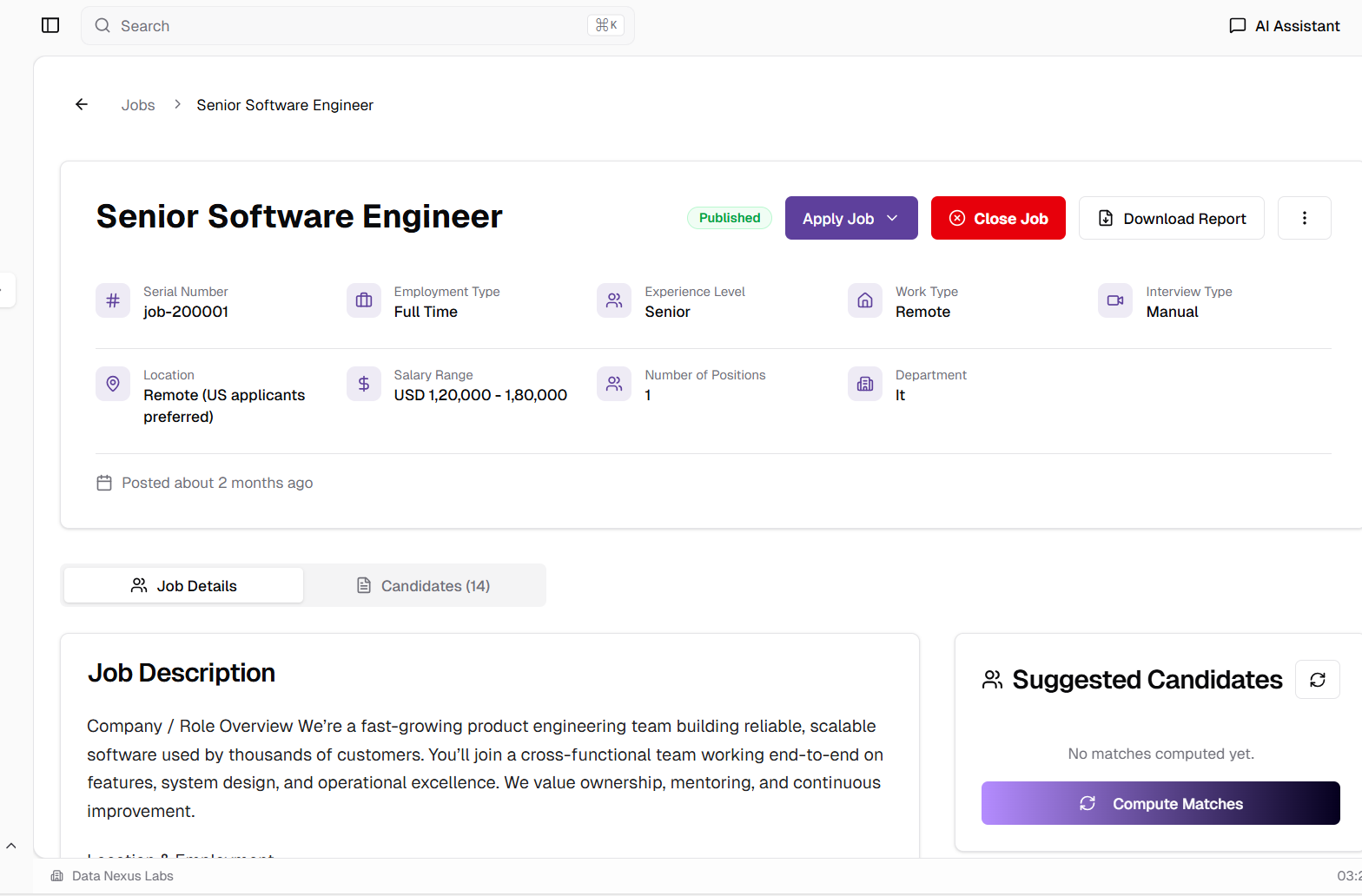
Download Report button available in job application page for instant PDF generation
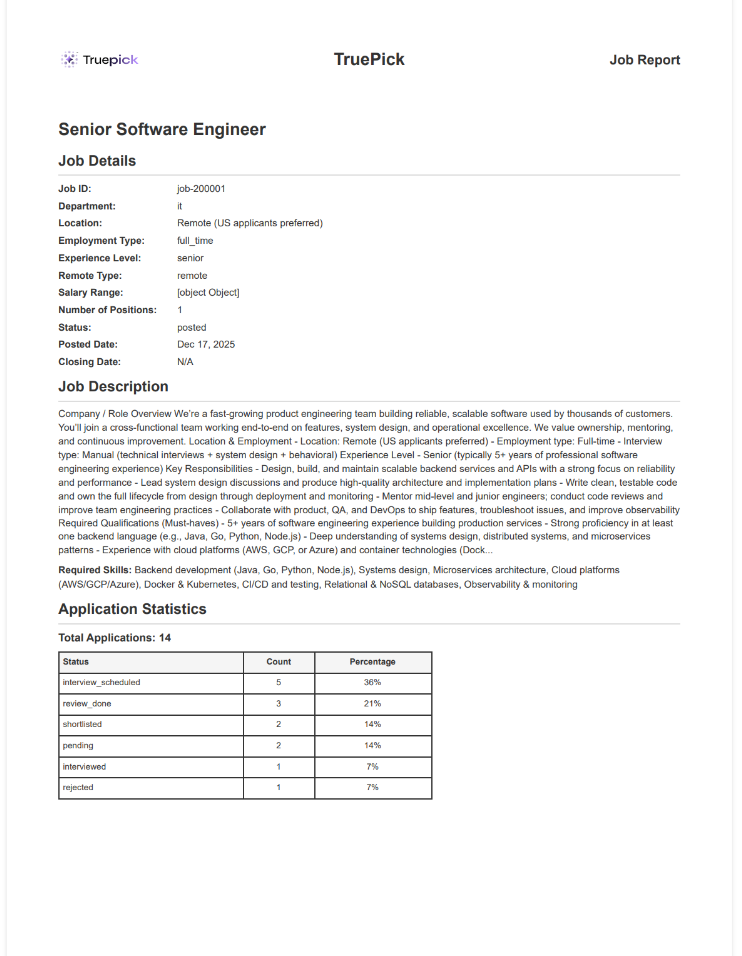
Job report PDF showing job details, statistics, and candidate table with scores and recommendations
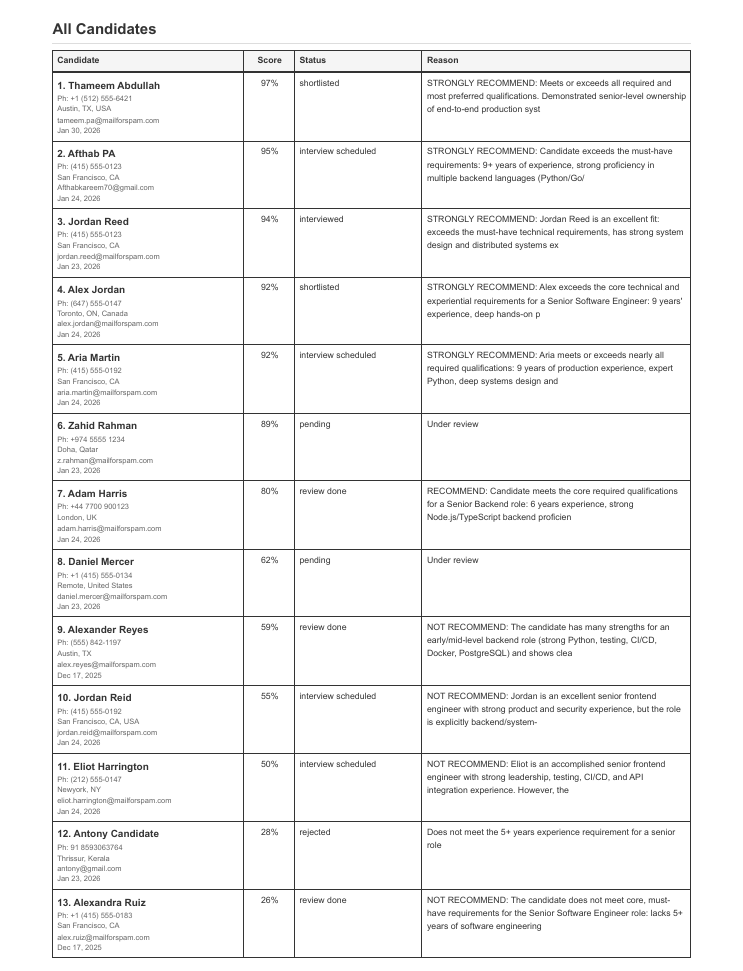
Continuation of candidate details table with proper spacing and professional layout
Bulk CV Upload
Upload and Process Multiple Candidate CVs Simultaneously
The new Bulk CV Upload feature revolutionizes candidate onboarding by allowing recruiters to upload multiple CV files at once. The system intelligently processes each CV through a 10-step AI-powered pipeline, automatically extracting candidate information, creating applications, running AI reviews, and optionally assigning assessments - all in the background.
Core Features:
- Batch File Upload: Upload multiple PDF and DOCX files in a single operation
- Folder Selection: Select and upload entire folders of CVs at once
- 10-Step AI Processing: Comprehensive background job pipeline with progress tracking
- Intelligent Extraction: AI-powered candidate information extraction from CVs
- Duplicate Detection: Automatic checking for existing candidates
- Auto AI Review: Automated candidate scoring and recommendation
- Smart Shortlisting: Automatic shortlisting based on qualification thresholds
- Assessment Assignment: Optional automatic assessment assignment to qualified candidates
- Real-Time Progress: Track processing status for each CV in real-time
Supported File Formats:
- PDF Files (.pdf): Standard PDF resumes and CVs
- Word Documents (.docx): Microsoft Word format CVs
- Restrictions: Only PDF and DOCX files are accepted, other formats are rejected
10-Step Processing Pipeline:
Step 1: Validating Files
- Checks that all uploaded files are PDF or Word documents
- Ensures files can be opened and read properly
- Rejects any unsupported file types
- Time: ~2-5 seconds
Step 2: Extracting Headers
- Reads the beginning of each CV to understand its content
- Prepares files for the next validation step
- Time: ~3-8 seconds per file
Step 3: Classifying Resumes
- AI verifies each file is actually a resume or CV
- Filters out cover letters, reference letters, or other non-resume documents
- Only resumes move forward to the next steps
- Time: ~5-10 seconds per file
Step 4: Extracting Candidate Information
- AI reads and extracts all candidate details from the CV
- Captures name, contact information, work experience, education, and skills
- Works with different CV layouts and formats
- Time: ~10-20 seconds per file
Step 5: Creating Candidates
- Checks if the candidate already exists in your system
- Creates a new candidate profile or updates existing one
- Stores the CV file for future reference
- Time: ~2-5 seconds per candidate
Step 6: Creating Applications
- Creates a job application for each candidate
- Links the application to your job posting
- Sets the initial status for tracking
- Time: ~2-3 seconds per application
Step 7: Running AI Reviews
- AI evaluates how well each candidate matches your job requirements
- Generates a match score from 0-100%
- Identifies candidate strengths and areas of concern
- Provides recommendation reasoning
- Time: ~15-30 seconds per candidate
Step 8: Auto-Shortlisting
- Automatically identifies the most qualified candidates
- Moves high-scoring candidates to "shortlisted" status
- Helps you focus on the best matches first
- Time: ~1-2 seconds per candidate
Step 9: Assigning Assessments
- Checks if your job requires skills assessments
- Automatically assigns assessments to qualified candidates
- Sends assessment invitations (if email notifications are enabled)
- Time: ~2-5 seconds per candidate
Step 10: Finalizing
- Completes the entire upload process
- Updates progress tracking
- Sends you a completion notification
- Time: ~1-2 seconds
Total Processing Time: Approximately 1-2 minutes per CV (varies based on file size and content)
How It Works:
Uploading Bulk CVs:
1. Navigate to the job you want to add candidates to
2. Click the "Apply to Job" dropdown button
3. Select "Bulk Upload CVs" option from the dropdown
4. Folder picker dialog opens
5. Select the folder containing your CV files (PDF or DOCX)
6. Click "Select Folder" to start upload
7. All CV files from the folder are uploaded automatically
8. Processing begins and you're redirected to the tracking page
9. Monitor real-time progress as each CV is processed
Monitoring Progress:
1. After upload, you're redirected to job tracking page
2. View overall progress bar showing completion percentage
3. See current step being processed with description
4. Track individual step completion (Step X of 10)
5. Monitor estimated time remaining
6. View detailed step-by-step progress logs
7. Receive notification when processing completes
Reviewing Results:
1. Once processing completes, navigate to job applications page
2. View all newly created candidate applications
3. Review AI scores and recommendations for each candidate
4. Check auto-shortlisted candidates
5. Verify assessment assignments (if applicable)
6. Begin interviewing qualified candidates
Key Features:
Intelligent Processing:
- Resume Validation: Filters out non-resume files automatically
- Smart Extraction: AI understands various CV formats and layouts
- Duplicate Prevention: Avoids creating duplicate candidate records
- Quality Scoring: Generates accurate AI review scores and recommendations
- Threshold-Based Actions: Auto-shortlist only qualified candidates
Background Job Processing:
- Non-Blocking: Upload and continue working while files process
- Progress Tracking: Real-time visibility into processing status
- Error Handling: Gracefully handles failed extractions or invalid files
- Step Retry: Ability to retry failed steps individually
- Parallel Processing: Processes multiple CVs concurrently for speed
Automation Benefits:
- No Manual Data Entry: Candidate information extracted automatically
- Automatic AI Review: Scoring and recommendations generated instantly
- Smart Shortlisting: Qualified candidates identified automatically
- Assessment Automation: Assessments assigned to eligible candidates
- Time Savings: Process 50+ CVs in minutes instead of hours
Benefits:
- Massive Time Savings: Upload 50 CVs in 5 minutes vs. 50 individual uploads
- Consistent Processing: Same AI evaluation applied to all candidates
- Reduced Manual Work: No need to manually create each application
- Faster Hiring: Get candidates into interview pipeline immediately
- Quality Assurance: AI validates resume quality before acceptance
- Scalable Recruitment: Handle high-volume hiring efficiently
- Better Candidate Experience: Faster application processing
- Data Accuracy: AI extraction more consistent than manual entry
Use Cases:
- Campus Recruitment: Upload hundreds of student CVs from career fair
- Job Board Integration: Bulk process applications received via email
- Recruitment Drives: Handle large-scale hiring events efficiently
- Agency Partnerships: Process candidate batches from recruitment agencies
- Internal Mobility: Upload existing employee CVs for internal roles
- Contract Hiring: Quick processing for temporary or contract positions
- Seasonal Hiring: Rapid candidate processing for seasonal peaks
- High-Volume Roles: Efficiently handle positions with 100+ applicants
Best Practices:
- Organize Files: Name CV files with candidate names for easy identification
- Use Folders: Organize CVs by source (job board, referral, etc.) before upload
- Check Formats: Ensure all files are PDF or DOCX before upload
- Monitor Progress: Watch the first few uploads to verify processing accuracy
- Review Results: Verify AI extracted information is accurate
- Adjust Thresholds: Configure auto-shortlist thresholds based on role requirements
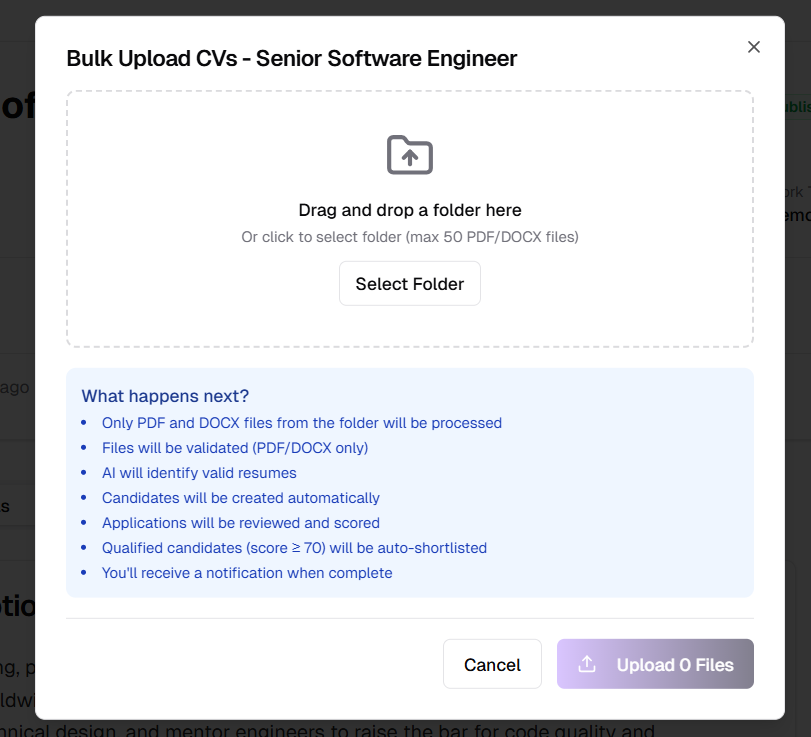
Bulk Upload CVs option in Apply to Job dropdown for uploading multiple candidate files at once
UI/UX Improvements
Cleaner, More Focused Interface
This release includes significant UI/UX refinements to reduce visual clutter and create a more streamlined user experience. The interface has been simplified by removing non-essential elements from the status bar and app header, adopting a modern flat design system, and improving text readability across all dropdown menus.
Key Improvements:
- Simplified Status Bar: Removed online/offline status, AI usage metrics, and background job indicators; now displays only essential information (company name and current time)
- Streamlined App Header: Removed redundant company switcher, sign out button, and theme toggle for a cleaner header
- Modern Flat Design: Removed card shadows throughout the application for a contemporary, distraction-free appearance
- Settings Layout Polish: Removed unnecessary vertical separator lines for better visual flow
- Enhanced Notifications: Redesigned notification system with timeline-based layout for improved visual hierarchy
- Better Dropdown Readability: Fixed muted text visibility on hover/focus states across all dropdown components
Benefits:
- Reduced information overload and visual noise
- More focused, distraction-free interface
- Improved readability and accessibility
- Consistent modern design language
- Better visual hierarchy and content organization
Released on February 13, 2026
View all releases