Summary
This release is about working as a team, and about seeing more of what the platform already knows.
Everyone in a workspace can now do everything in it. Until now, many actions still only worked for the person who created the job or assessment. A teammate could open a job but not save changes to it, open an application but not edit its evaluation, or build an offer but not send it. That's gone: every workspace member can edit, rescan, evaluate, download and send offers on all of the workspace's jobs, assessments and applications.
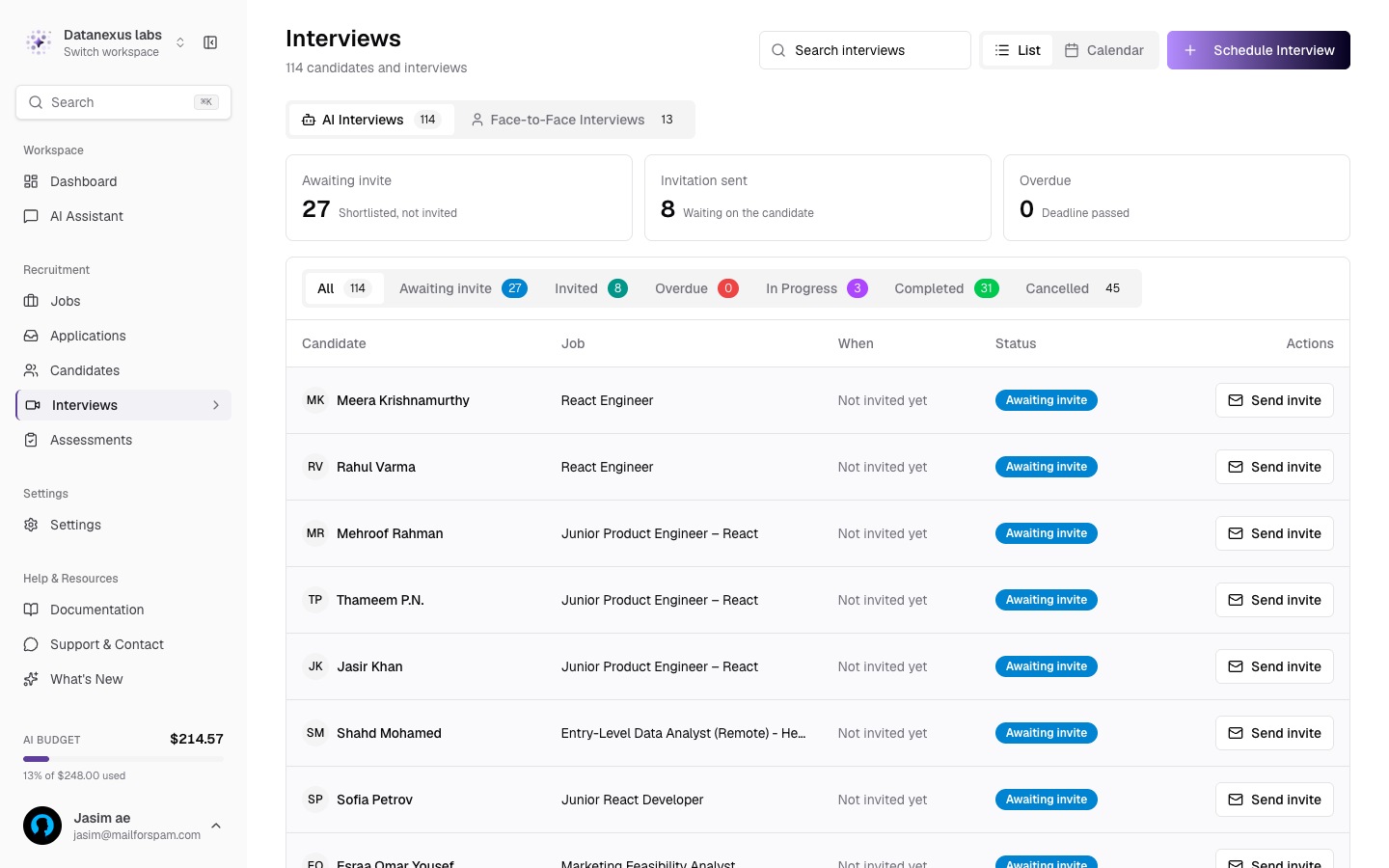
AI interview invitations now show on the Interviews page. Before, an AI interview only appeared once the candidate opened their link. Now you can see who is waiting for an invite, who has been invited, and whose deadline has passed, and send or resend invites from the same list.
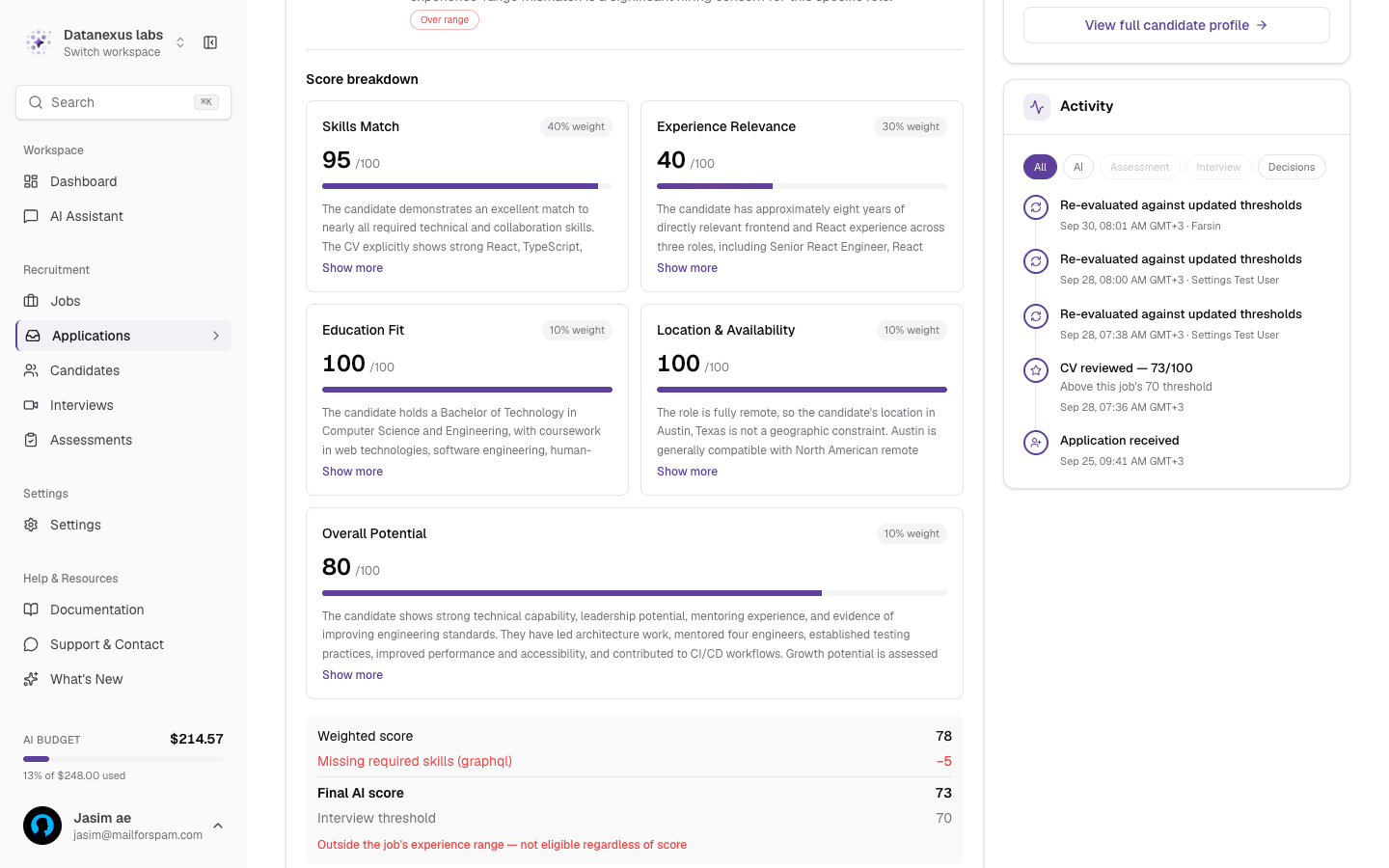
You can see why a candidate got their CV score. The CV Review tab on an application now breaks the score down by skills, experience, education, location and potential, with the AI's reasoning for each, and lists every penalty that was applied.
What's New
AI interview invitations on the Interviews page: an AI / Face-to-face selector, status tabs for each type, a summary of awaiting, invited and overdue candidates, and Send invite and Resend link actions right in the list
CV score breakdown: every weighted dimension with its score and reasoning, the penalties applied, and the final score compared with the job's interview threshold
Workspace-wide access: every workspace member can edit and act on all of the workspace's jobs, assessments, applications, evaluations and offers
A clear page for closed jobs: a shared link to a job that has closed now says the position is no longer accepting applications, instead of showing "not found"
Improvements
Sign-in and password reset now ignore capital letters in your email address, so `Name@Company.com` and `name@company.com` are the same account
The password reset flow is now fully translated into Arabic, along with the rest of the sign-in pages
After 5 wrong passwords, sign-in is now paused for 5 minutes instead of 15, and signing in successfully resets the count
The verification-code screens now remind you to check your spam or junk folder
After Too many attempts on a password reset code, the code boxes clear and a countdown shows when you can try again, instead of the screen looking frozen
The Resend code button no longer gets stuck on "Sending…"
Virtual interviews (Google Meet, Teams or Zoom) now need a meeting link before the invitation can be sent, so candidates always get a working Join link. A pasted `meet.google.com/…` link is completed with `https://` for you
Switching workspace now takes you to that workspace's dashboard, instead of a "not found" page when you were on a job from the previous workspace
Changing only a job's experience range handling, description, skills or requirements now offers to apply the change to existing applicants, and Re-scan All now applies the job's current range settings
The job and applicant lists now use the same CV threshold as the application page, so a candidate is never shown as passing in one place and failing in another
Editing a CV review no longer removes its score breakdown
Fixes
Download CV and Download Report on the application page, and Download Report on the job page, now work for every workspace member
A candidate who had applied before and applies again now sees "You have already applied for this role" instead of an error
An application in progress is no longer lost when a tablet is rotated or a browser window is resized
Scores now appear on the applicant list after a rescan without refreshing the page
A CV review that fails is now retried with a second AI model instead of staying at "Pending"
Generate questions now lists every job in the workspace, not only the ones you created
In Microsoft Edge, the password field no longer shows two eye icons
Buttons show the pointer cursor again when you hover over them
AI Interview Invitations on the Interviews Page
See every AI interview, from shortlist to completed
An AI interview used to appear on the Interviews page only after the candidate opened their link. Until then, the only way to know who you had invited, or who never started, was to open each job.
The Interviews page now opens on AI interviews, with a switch to Face-to-face. Each type shows only the statuses it can reach:
AI: All, Awaiting invite, Invited, Overdue, In progress, Completed and Cancelled
Face-to-face: All, Scheduled, Rescheduled, Completed, Cancelled and No show
A summary above the list counts the AI candidates that need your attention:
Awaiting invite: shortlisted, not invited yet
Invitation sent: waiting on the candidate
Overdue: the deadline has passed
Candidates in these groups appear in the list with Send invite or Resend link, so you can act without leaving the page. The count on every tab matches the rows you see when you open it. You can also search the list by candidate name.
CV Score Breakdown
See why a candidate scored what they did
The CV Review tab on an application used to show only the final score, the verdict, strengths and concerns. Now the AI CV Review card also has a Score breakdown:
One card per dimension: Skills (40%), Experience (30%), and Education, Location and Potential (10% each), each with its score and the AI's reasoning
Every penalty applied: a location mismatch, missing required skills (with the skills named), or being outside the job's experience range
The result: the final AI score next to the job's interview threshold, and whether the candidate meets it
If someone on your team changed the score, a note shows the original and the new score. The breakdown always shows how the AI scored it.
CV reviews edited before this release may have lost their breakdown, and will show none.
Everyone in the Workspace Can Act
No more "access denied" on a teammate's job
Every member of a workspace is an admin, but many actions still checked who created the job, assessment or application. Teammates ran into "Job not found or access denied", "Forbidden" or "Company profile not found", or found an application they couldn't edit.
Every workspace member can now:
Edit and save any job, and rescan or re-evaluate its applicants
Edit CV reviews and interview evaluations, and send offers
Edit, clone and delete any assessment, and assign it to candidates
Download CVs and candidate and job reports
Use any job in the workspace for Generate questions
Some things stay personal: your chat history, settings, API keys and interview availability. Adding credits is still limited to the workspace owner.